Christmas is right around the corner. Find out if Santa should pick these up for you!
We all have that pair of headphones that we really like as well as that pair that we don’t like, but we can’t find the strength to get rid of them. That’s because a good pair of headphones is hard to find, and usually, when we find one, we’ll hold onto it, like our lives depend on it. I have reviewed headphones in the past, as well as headsets for GamerFudge.com and have found a few keepers. Recently, I was lucky enough to receive two pairs of Cleer Arc 3 Gaming Open Ear Wireless headphones to check out for review purposes. Find out in the review if Santa should make a stop to pick up the Cleer Arc 3 Open Ear Wireless headphones for you or for someone special.
When you get ahold of the Cleer Arc 3 Gaming Open Ear Wireless Headphones, you’ll get a case that houses the headphones, a dongle to connect the headphones to your PC/phone, a charging cord for the case and a cloth for cleaning. Let’s get the main thing out of the way now: the cloth is very soft and satin-like. (What do you mean that’s not what you wanted to know about?)
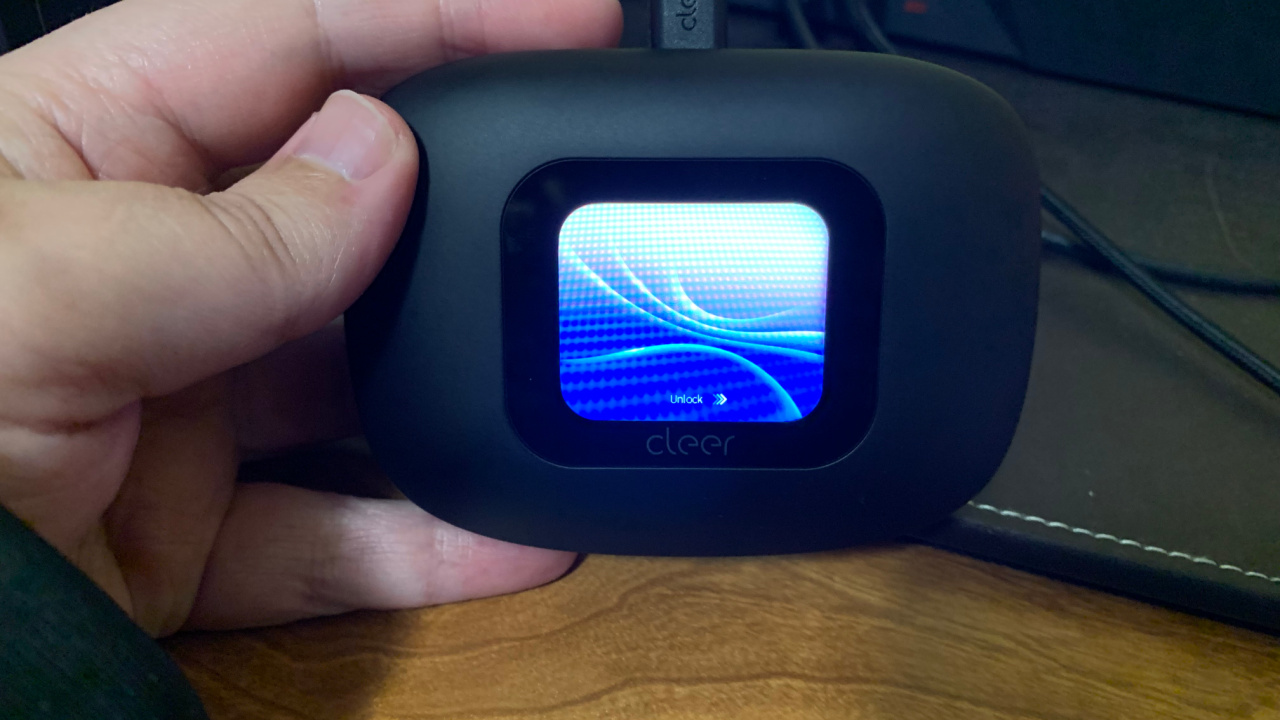
We’ll start with the case the headphones come in. The case has a lot of interesting features packed into it. Plug it in, and it should power right up. You use touch to cycle through the different settings for the case, but the touch features aren’t super responsive. It took me a few chances to swipe the right direction to get into the menu for the case, thus the only touchscreen issue I had. You can connect the headphones to your device via Bluetooth hookups, and then you can use the case as the controls. Think of an old school iPod that you can use to listen to music on. If you need to, you can reset the case to factory settings. I had to reset the case after I set a language I didn’t understand when I was peeling the plastic off the screen, the very first time I used it. Either way, it was an easy reset. You can also measure your steps as well as set an auto turnoff setting, like a power save mode. It also has a timer that you can use to shocker, time things. One of the cooler features on the case is that it has a find my earbud setting where it will make a noise to help you find misplaced earbuds. That’s a really nice feature to have, especially on something small like an earbud.
Two more interesting features for the case is a camera mode and a pairing section where you can leave the headphones inside the case to pair them with different devices. The camera is interesting because you don’t usually hear about headphone cases having camera settings. You will get way more out of the camera by installing the Cleer+ application on your phone/smart device. Cleer+ allows you to customize the settings the way you want. You can also check to see if your device is up to date or needs an update. It was on the application that I found out that you can set the earbuds to respond to vocal commands.
This was a game-changer for me as I was struggling to find a comfort zone in touching the earbuds to cycle between songs and raise/lower volume. Being able to just say “Next Song” or “Volume Up” makes things so much easier for me. In terms of the camera mode, you can use the case as the “take picture” button on the camera and use your phone/smart device as the actual camera. So if you wanted to give your friend your phone to take a picture, but they struggle pushing the shutter too many times. This way, you can push the button yourself and save the picture directly to your photo album. It’s an interesting feature that I didn’t know could be a thing, but I like the idea of having it. The case has a sterilization feature that cleans the earbuds with UV-C light. Just hold the UV button on the case, and you’ll give your headphones a nice cleaning.
When I first saw the Cleer Arc 3 Gaming Open Ear Wireless Headphones, I thought they were going to be earbuds that get inserted into the ear. When I opened the case, it was nice to see that they don’t go into the ear. In fact, they go more toward the top of the ear. Usually, I have trouble getting comfortable with earbuds because of the reason I just mentioned, but these are very comfortable, and I think I could wear these for hours without having to take them off because they were hurting me/not comfortable on my ears. I did have a little trouble adjusting them for size but I didn’t have to screw around with them too long to get them to fit my ear. You can charge the earbuds in the case, and the screen has the battery life on the top of the screen so you won’t have to worry about them going dead.
The earbuds will also tell you when the battery is low a couple of times before they go dead, so that’s a nice feature. These things have some amazing range on them. My office is on the second floor of our house, and I could still get music/reception clear as day in the basement of said house. Phone reception isn’t great in our home, so I thought the earbuds wouldn’t get service in the lower levels of the home, but again was surprised when it did. I tested this on my PC as well as my iPhone, both connected via Bluetooth. Both the phone and the PC passed the test as I was able to listen to music all throughout the home. I also tried them while playing games on my PC as well and was impressed by the sound quality.
To sum up, the Cleer Arc 3 Gaming Open Ear Wireless Headphones are one of the better headphones I’ve had the privilege to review. I love the range on them, as it appears you don’t need to be too close to the paired device to have clear sound. I also love the voice command option, which, in my opinion, makes using the earbuds much easier, as you don’t have to remember how many times you have to tap and hold the earbud. That being said, the screen on the case isn’t super responsive, and the earbuds are a little finicky when it comes to adjusting the size. When you get them adjusted, you might forget you have them on with how comfortable they are. I think the Cleer Arc 3 Gaming Open Ear Wireless Headphones might become one of my go-to pairs of headphones for car rides and walks because of how comfortable they are to wear and the range you can get from them. There are a few days left until Christmas, so you have time to add them to your Christmas lists!